|
|
|
 Most of audio/video format can be played by the Image Scripts: Most of audio/video format can be played by the Image Scripts:
| | Audio: | .mp3, .wav, .mid, .rmi, .au |
| | Video: | .dat, .avi, .mpg, .wma, .asf, .asx, .mov, .wmv |
Navigation
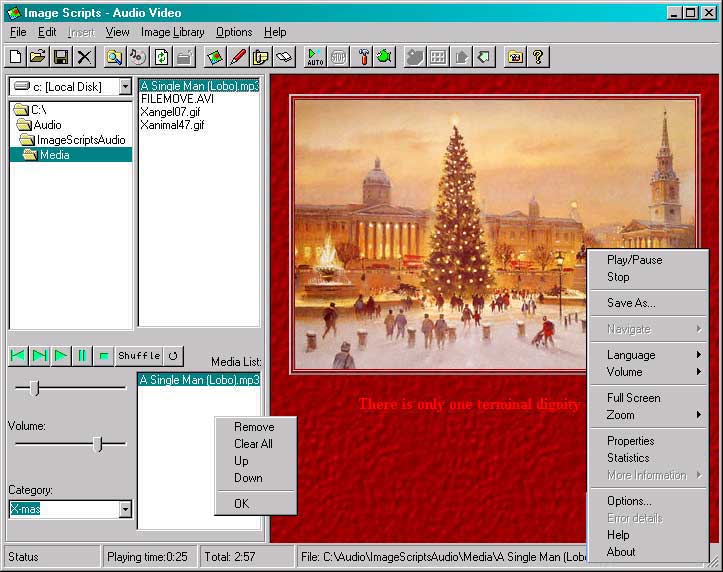
- Use the Dir and File list box to locate audio/video file.
- Double click to past the selected file to media list that is under the file list box
- Media files in the list will be played, you can change their order, remove or clear the list by menu under clicking right mouse.
- Play status are shown in status bar
- Play position and volume are controlable by two sliders in left.
View Option
If you are viewing a video file, click right mouse to the show to find menu, where you can
- Change size: 50%, 100%, 200%, full view
- See media information
- Pause, play, stop
Save
A audio folder can be saved for playing while browsing images from library later. Click menu File/save or button  in tool bar to save. in tool bar to save.
Show Menu For Media Control
Put mouse in file list or media list or video screen, click right mouse you will see menu to control media like menu in the picture above
Open Saved Media Folder
Click menu File/Open/Image, media or button  in tool bar to see a list of image/media folders. in tool bar to see a list of image/media folders.
Click an item of the list (with media type) or click button  in toolbar again to open the saved media folder. in toolbar again to open the saved media folder.
Remove Saved Media Folder
Click menu File/Open/Image, media to see a list of image/media folders. Click an item of the list and click menu File/Remove or button  in tool bar in tool bar
Hide/Unhide Media Control
Click button  in tool bar in tool bar
Notes
Context menus are available by clicking with the alternate mouse button in the file list, tool bar.
You can navigate by mouse or keyboard for items in file list and effect list.
A lot of "How to" Q&A could give more details for effective use of the Image Scripts.
|
| |


